

New Features in alameen ERP Version 10

Continuous work at alameensoft was not just for the sake of releasing a new version, but rather to achieve excellence and uniqueness. With years of experience and a comprehensive understanding of user needs, alameen ERP secures a leading position in the world of integrated programming systems, making it a successful investment in your organization's resource planning.
With alameen ERP version 10, you get a seamless experience with smart tools and modern features that organize the chaos of numbers and transform your work environment into a space for creativity and achievement.
What awaits you in alameen ERP version 10? What are the new features of this release?

alameen Cloud... Evolution that keeps up with your business
By running alameen ERP on the cloud, enjoy features like automatic backup, high security, instant updates, and reduced operational costs related to maintenance and technical support, in addition to the new features of version 10.
Now, you can access your financial and accounting system from anywhere and at any time with ease and flexibility.

alameen Cloud guarantees you:
A service based on an advanced licensing system fully managed by the alameen team.
Maintenance and updates that provide you with the latest features.
Your data is securely stored on company servers with automatic backup to protect it from any risk.
A stable, secure, and business-accelerating operating experience.
Your financial decisions can't wait... Approve instantly via the alameen Approvals App
We offer you an integrated approvals system to manage approvals for sensitive operations with precision and flexibility.
Now, managers can approve or reject invoices and vouchers with a single click, while on the go or traveling, anytime and anywhere, through the brand-new approvals app from alameensoft.

Download the app and benefit from the offered services:
Greater control.
Instant monitoring.
Faster decision-making.
A secure and flexible environment.
alameen Dashboards App... Information panels on both computer and smartphone
alameensoft presents a new app for all alameen ERP users, as part of a series of new programs accompanying version 10. The Alameen Dashboards app brings interactive dashboards from alameen ERP to your phone, just as you see them on your computer screen.
Monitor financial performance, inventory, and sales in real time through a sleek and easy interface, designed for quick decisions and comprehensive data awareness.
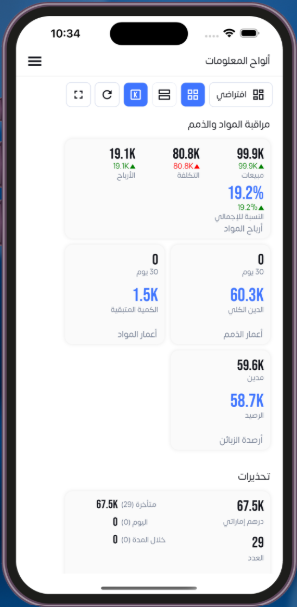
A unique app launched by alameensoft for greater benefit from the desktop dashboard feature, so your dashboards are available on your computer and phone wherever you go.
Commission System in alameen ERP... A fair and professional solution
Benefit from the new commission system in alameen ERP to ensure fair payment of financial entitlements based on actual performance and achieved sales.
It has become essential to provide smart and advanced accounting solutions that enable companies to calculate commissions automatically and accurately, according to customized rules and policies that align with business standards and organizational needs.

Achieve your profits smartly and easily, and connect your online store to alameen ERP
Turn challenges into real opportunities. You can launch your online store and rely on alameen ERP to add products, import sales invoices, and enjoy many benefits available in the new "integration with online stores" feature.
alameen ERP offers smart solutions specifically designed for the requirements of online stores, from order and inventory tracking to payment integration and financial reports.

Easy integration, data accuracy, and comprehensive performance visibility—all in one trusted system, with alameen ERP.
Financial statement and ratio analysis... A comprehensive and realistic view of your organization's performance
alameen ERP version 10 offers new and professional tools in the "Finance" tab. In today's rapidly changing business environment, it has become urgent to use financial analytics that contribute to business success.
alameen ERP provides the ability to analyze financial statements and ratios, to review business progress, compare results across time periods, and rely on them in making important decisions.

alameen ERP Reports: A qualitative leap in the world of data powered by technology
In version 10 of alameen ERP, the reporting experience moves to a new professional level. Reports are no longer just numerical tables; they have become smart analytical tools that provide you with strategic insights and complete data control.
It's an advanced competitive feature compared to previous versions of alameen, supported by modern interfaces and flexible tools that enhance work effectiveness and decision efficiency.
Now you can easily:
Add pages, tables, and dynamic charts.
Design professional reports, color and format cells as you wish.
Customize columns and summaries to match your analytical needs.
Include customer and item images for clearer and more realistic reports.
Benefit from smart sorting and conditional formatting to automatically highlight key indicators.
Aggregation, filtering, and printing tools in reports provide a smooth and integrated user experience, enabling you to achieve accurate results in record time.
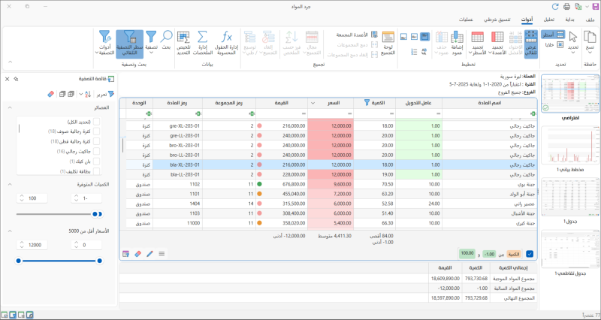
In alameen ERP, reports in version 10 have become a true command center, giving the financial manager precise analytics, impressing executives with clear insights, and simplifying daily employee tasks. These are reports designed to drive your organization toward faster, smarter, and more confident decisions.
Dashboards, instant access to your business details
Unmatched ease of accessing your data directly from the desktop. You can pin interactive dashboards that display important financial and administrative reports and data.
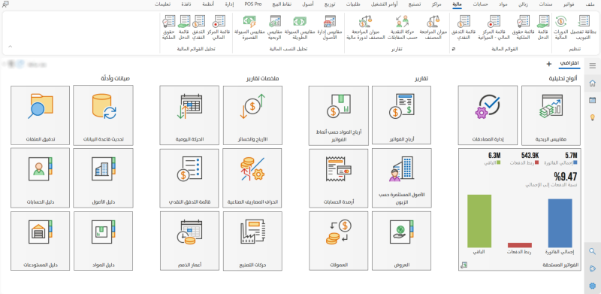
Monitor your business in real time without switching between menus and windows. This simplicity and speed in accessing information enhance your ability to make precise decisions, keeping you always ahead in business management.
alameen ERP Sharing Center... The smart communication hub
The Sharing Center marks a qualitative shift in how teams communicate and manage projects within alameen ERP. It provides a convenient environment for exchanging files and reports and tracking tasks smoothly and efficiently.
Whether via email, SMS, WhatsApp, or even direct files, you can now share dashboards and reports from your desktop easily with any party connected to the software.
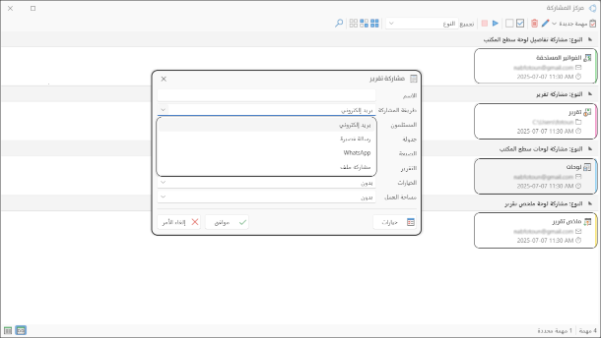
Thanks to ease of use and instant access, your team remains connected and in sync, whether in the office or remotely.
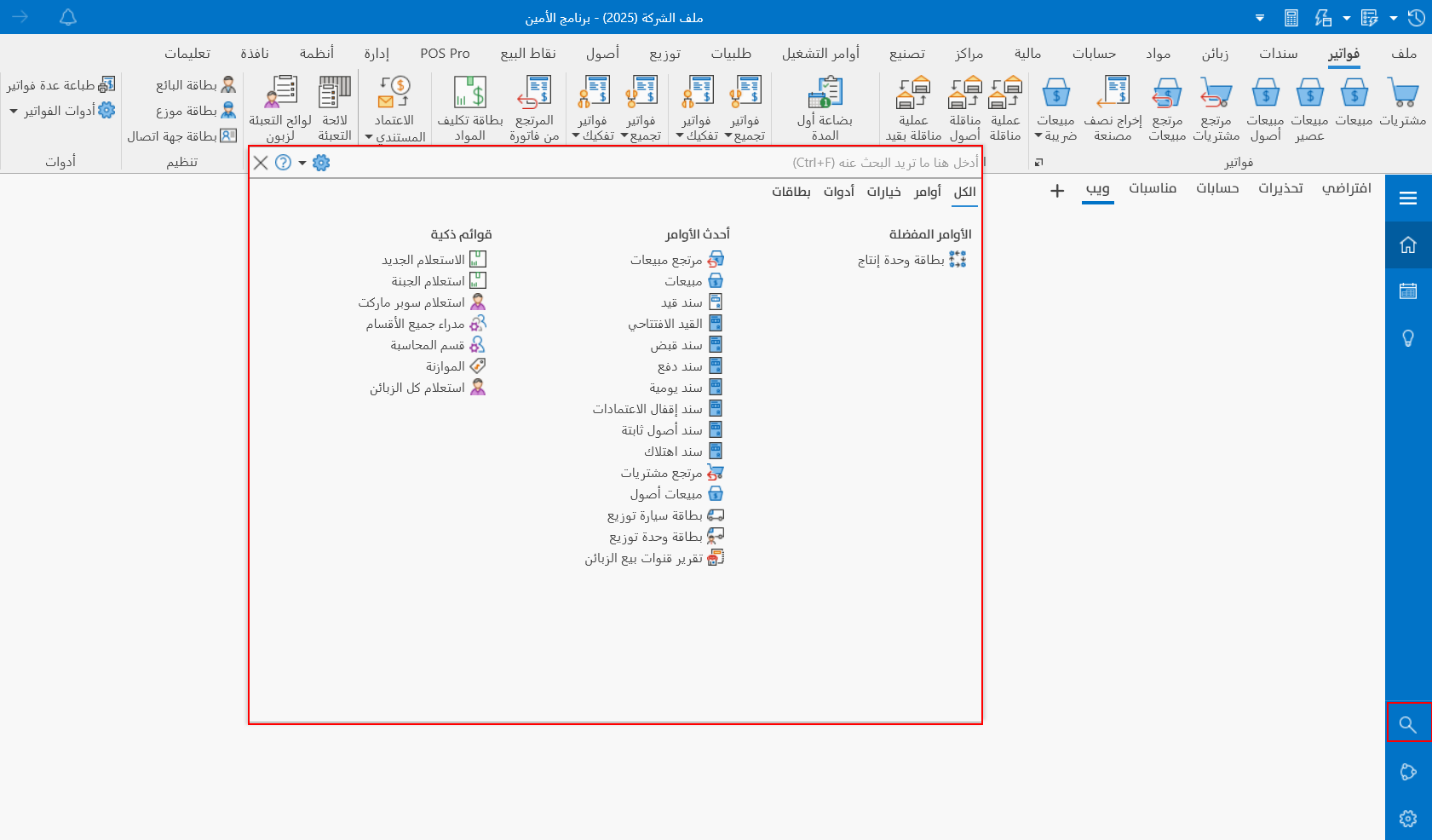
Quick Search... Your time is valuable in alameen ERP
Make your journey inside the software faster than ever with the quick search tool on the desktop, designed to get you what you need in seconds, without wasting time navigating menus and windows.
This tool was developed to boost your productivity and provide you with an ideal user experience. Try it now and feel the difference yourself!
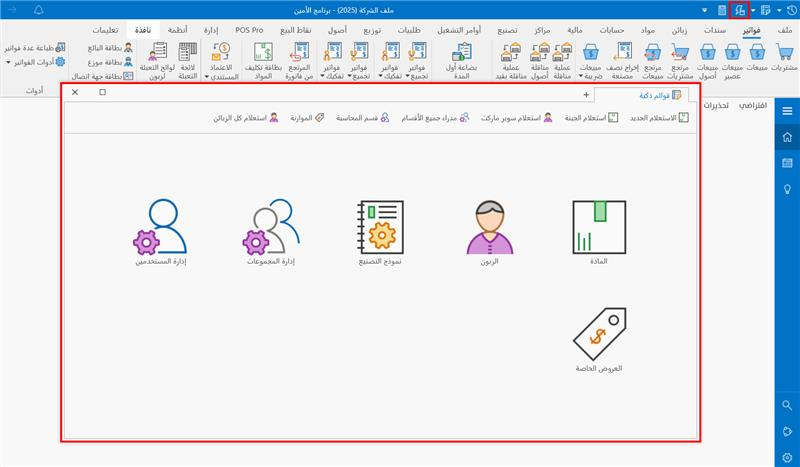
Smart Lists... Control thousands of data entries in one operation
With the new smart lists in alameen ERP, create your own conditions and modify texts and numbers in a single, flexible step.
Version 10 of the software offers you an effective feature with smart tools to view your data and execute operations collectively and instantly.
Smart lists are available for items, customers, users, groups, special offers, and manufacturing templates.
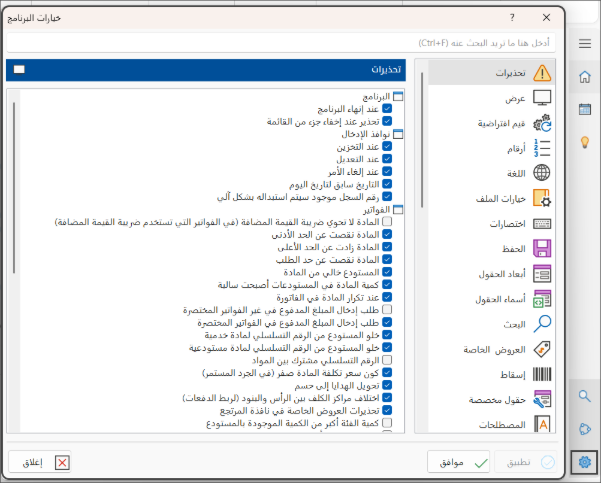
Program Options... Adjust your profile in a single window
Do you waste time switching between windows to find the settings you need? Now you can find what you want in alameen ERP using just one window!
Instant search, automatic and direct highlighting as you type in the search box, and quick access using the new program options window in version 10.
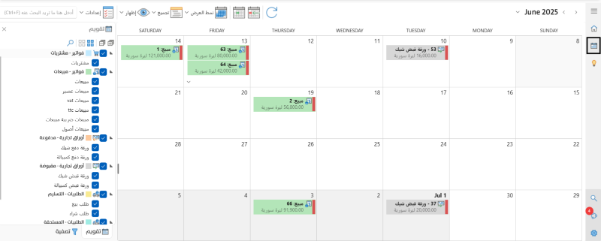
Calendar... A guarantee for lasting professionalism
With the Smart Calendar feature in alameen ERP, organizing and managing financial tasks has become easier and more accurate than ever. It's the perfect solution to facilitate tasks, maintain workflow, and avoid delays.
Automatic reminders for due dates of invoices, vouchers, commercial papers, and orders, ensuring precise follow-up and instant execution without delay.
Automated alerts for invoice, voucher, order, and all commercial paper due dates, so your account is always under control.
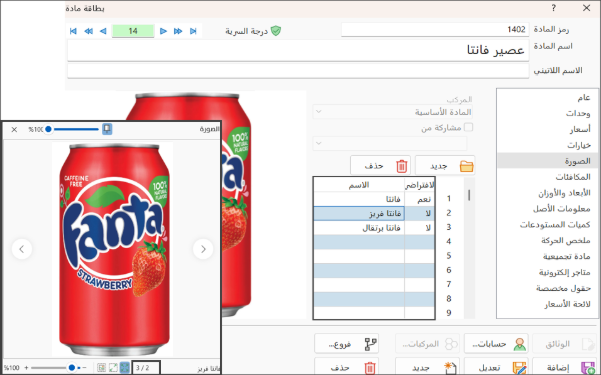
Items in alameen ERP with multiple images
The multiple images feature in the item card allows you to display the product using various images, making it easier to identify accurately and reducing errors in invoices and warehouses.
You can now set a default image and keep all images inside the database for access even if they are deleted from the computer or their path is changed.
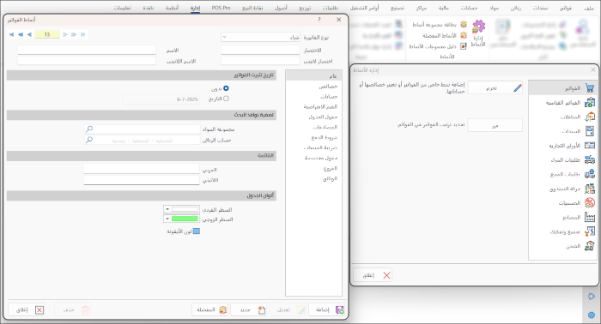
Favorite Styles... A flexible interface tailored to your needs
The work experience has become more flexible and organized. You can now customize the command bar to suit your work nature by selecting the most used commands and arranging them by priority.
The software allows you to manage favorite styles easily and organize them by invoice type, branch, or list. All this to help you access your tools quickly and accomplish your tasks more efficiently. It's an interface designed to serve you.
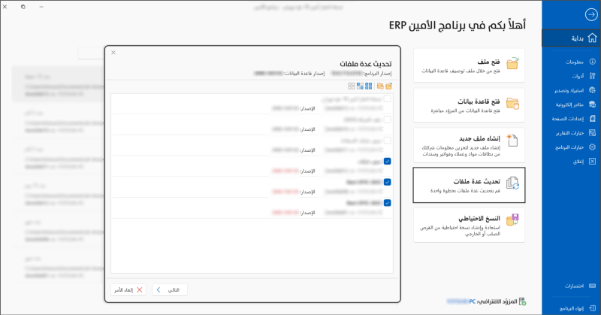
Update multiple files at once in alameen ERP
Updating program files will no longer be a burden for users, with the new feature that allows you to update multiple files with a single click.
Choose the update method that suits you, whether instantly or in stages. You can also test the update before execution to ensure safety and accuracy.
Control the number of files being updated simultaneously and view detailed update reports to stay always informed.
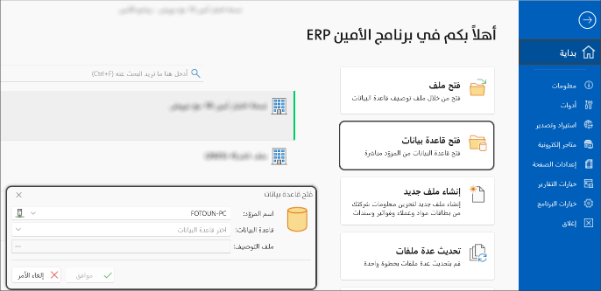
Open a database in alameen ERP as easily as possible
Opening databases no longer requires complex steps or manual profiles. Simply choose the provider name and database, and let the software handle the rest automatically.
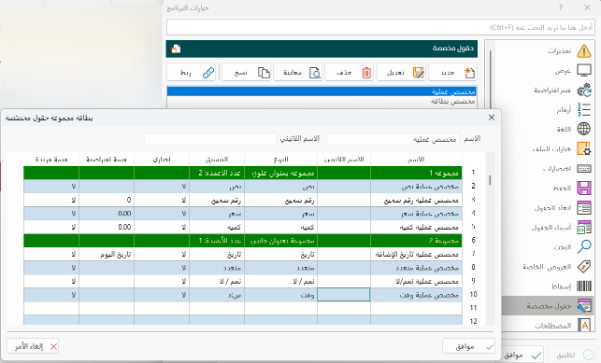
Give every detail its own custom field
Benefit from the custom fields feature in alameen ERP and design your own fields in the way that suits your business needs.
You can choose the name, type, and required format for each new field you add to cards, invoices, and vouchers.
Information windows with new tools
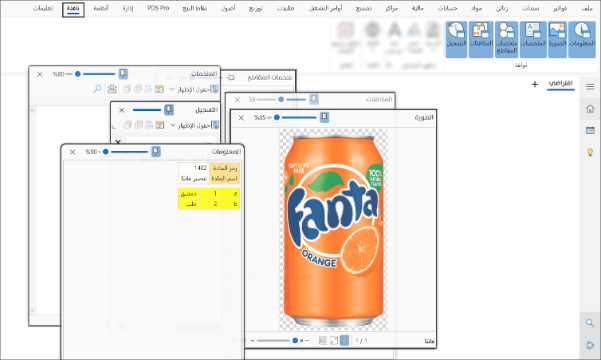
Version 10 of alameen ERP redesigns information windows to provide a clearer and smoother user experience with a tidy and modern interface.
Their adjustable transparency and ability to stay on top allow you to monitor your data without distraction, keeping them visible as needed.
The image window offers multiple display modes and zoom control, as well as navigation between item images for a quick view.
The new toolbar in registration and summary windows enables grouping, searching, and adjusting columns within the window, leading to high control and advanced efficiency in data analysis and execution.
Program appearance now matches your personal vision
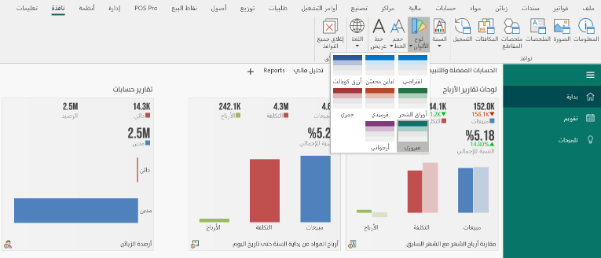
Transform the alameen ERP interface into a visual environment that suits your workplace, making your experience unique and suitable for long working hours.
By using the new "Program Appearance" group in the "Window" tab, you can use its buttons to control the program's appearance.
Ready-made themes.
Harmonized color palettes.
Different font sizes.
Status bar... Your information at a glance
With a comprehensive and instant view, user file information is now clear to alameen ERP users without any action. From the new status bar in version 10, you'll know the username, version number, database name, and many other essential details that matter to you.

Version 10 of alameen ERP is your guaranteed means for well-considered decisions and organized work. From the very first interface, you notice the effort made to make your experience easy and practical, built on your choices in browsing and formatting. Don't miss the latest features to benefit from rich and advanced tools.
Comments
Log in to join the conversation.